An Introduction to Visual Angles (Visual Angles Part I)
Stimulus positions on monitors can be defined using different types of spatial units. For example, spatial units available in PsychoPy are:
- Height
- Norm
- Pixels
- Centimetres
- Visual angles
This blog post introduces using visual angles for psychological experiments. It explains why visual angles matter, how to perform the relevant mathematical calculations, and what advantages and disadvantages visual angles have.
The second part of this series (currently work in progress) focuses on using visual angles in PsychoPy specifically.
What are visual angles?
Imagine you’re looking at a computer monitor. Also imagine you have only one eye that’s sitting directly above your nose.1 Imagine you’re looking straight ahead at a stimulus in the centre of the screen. Because you’re looking directly at it, by definition, the visual angle is 0 degrees2:

Now, if a new stimulus appears somewhere else on the screen, it’s positioned at an angle relative to where you were just looking. For example, we might present a new stimulus at a visual angle of 20° to the right of the original stimulus3:
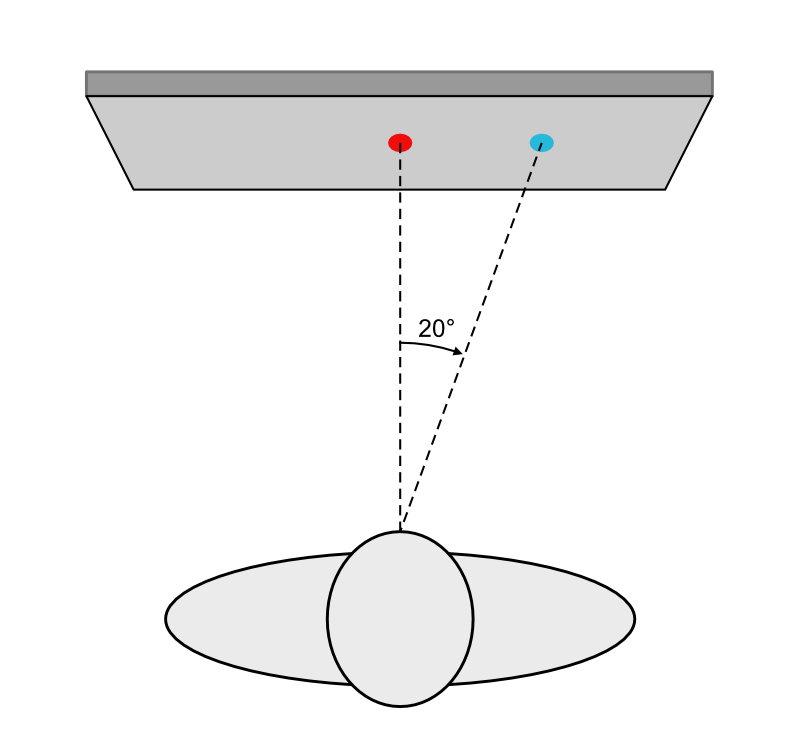
Note that visual angles depend on how far you are from the screen. If the stimulus stays in the same spot, but you increase the viewing distance, the visual angle gets smaller. In our example, increasing the viewing distance by 50% shrinks the angle to 13.6°4:
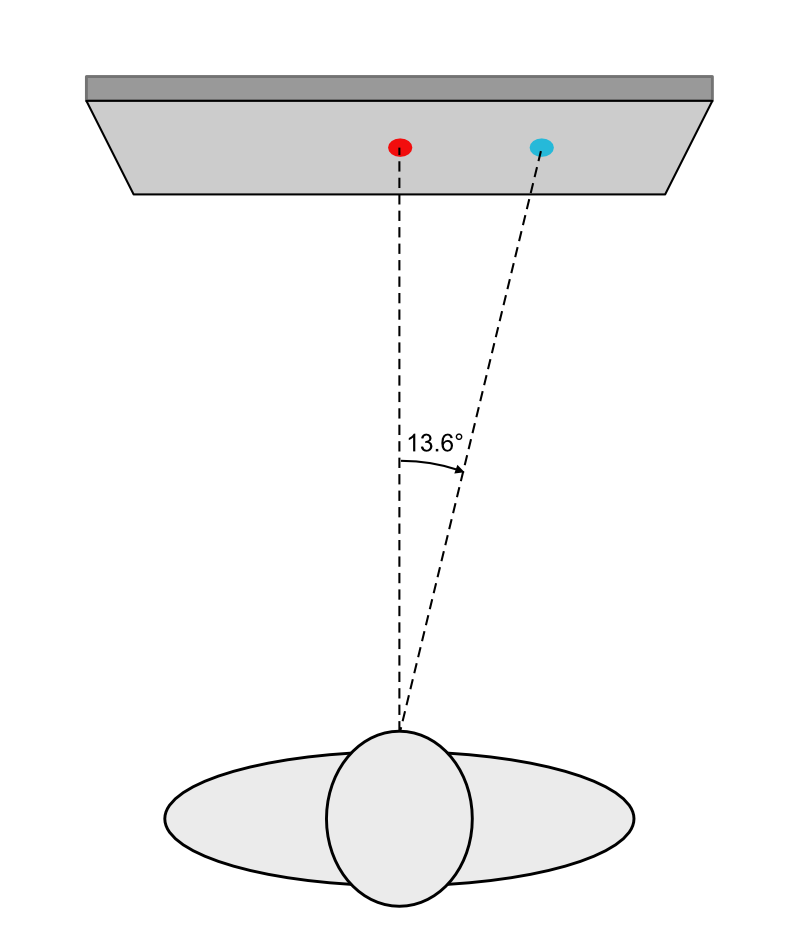
Accordingly, moving closer to the screen will increase the visual angle for a given location.
Relevance of visual angles
Visual angles matter because our visual acuity varies dramatically across the visual field. We see with the highest detail in a tiny region of the retina called the foveola, which corresponds to about 1° of visual angle in diameter. Outside this area, visual acuity drops off rapidly:
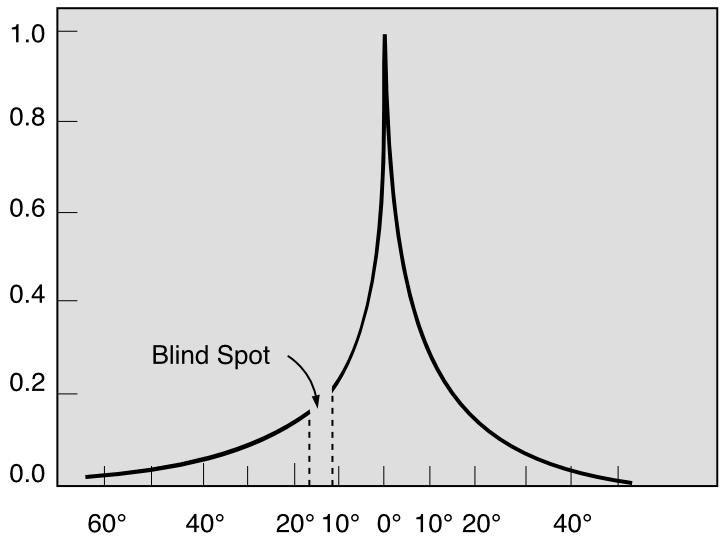

The position of a visual stimulus on the screen influences how it’s processed, including whether participants are likely to make eye movements to bring it into central vision. This, in turn, affects processing speed and, consequently, response time.
Monitor specifications
To calculate the position of a stimulus on the screen in various spatial units, we need more than just the visual angle and viewing distance. We also need to know the monitor’s physical dimensions (width and height in centimetres) and its resolution in pixels. Typically, you’ll find the resolution and diagonal size (in inches) in the system settings, user manual, or on the manufacturer’s website.
We’ll start by showing how to calculate the screen’s width and height in centimetres based on common specifications. If you’re already familiar with these calculations, feel free to skip ahead.
For this example, we’ll use a 27″ monitor with a resolution of 2560 × 1440 pixels. The relationship of width relative to height is referred to as the aspect ratio of the monitor. Common values are 16:9 or 16:10. Our example monitor has an aspect ratio of 16:9 or approximately 1.78:
\[\text{Aspect ratio} = \frac{2560}{1440} = \frac{16}{9} = 1.\overline{7}\]
As 1″ equals 2.54 cm, our monitor diagonal in centimetres is:
\[d_{cm} = 27 \times 2.54 = 68.58\]
To calculate the width and height of the screen, we can use the Pythagorean theorem, which relates the sides of a right-angled triangle:
\[a^2 + b^2 = c^2\]
In our example, we will use \(w\) to refer to the width of the monitor, \(h\) to the height, and \(d\) to the diagonal. Thus:
\[w^2 + h^2 = d^2\]
We already know the size of \(w\) and \(h\) in pixels and want to calculate \(d\) in pixels, so we need to solve for \(d\):
\[d = \sqrt{w^2 + h^2}\]
Using the known resolution, we can first calculate the length of the diagonal in pixels:
\[d_{px} = \sqrt{2560^2 + 1440^2} = \sqrt{8627200} \Rightarrow d_{px} \approx 2937.21\]
The pixel dimensions and the physical dimensions (in centimetres) must have the same proportions:
\[\frac{w_{px}}{d_{px}} = \frac{w_{cm}}{d_{cm}} \text{ and } \frac{h_{px}}{d_{px}} = \frac{h_{cm}}{d_{cm}}\]
This allows us to calculate the physical width of the screen in centimetres:
\[\frac{2560}{2937.21} = \frac{w_{cm}}{68.58} \Rightarrow w_{cm} = \frac{2560 \times 68.58}{2937.21} \Rightarrow w_{cm} \approx 59.77\]
And similarly, the height of the screen in centimetres:
\[\frac{1440}{2937.21} = \frac{h_{cm}}{68.58} \Rightarrow h_{cm} = \frac{1440 \times 68.58}{2937.21} \Rightarrow h_{cm} \approx 33.62\]
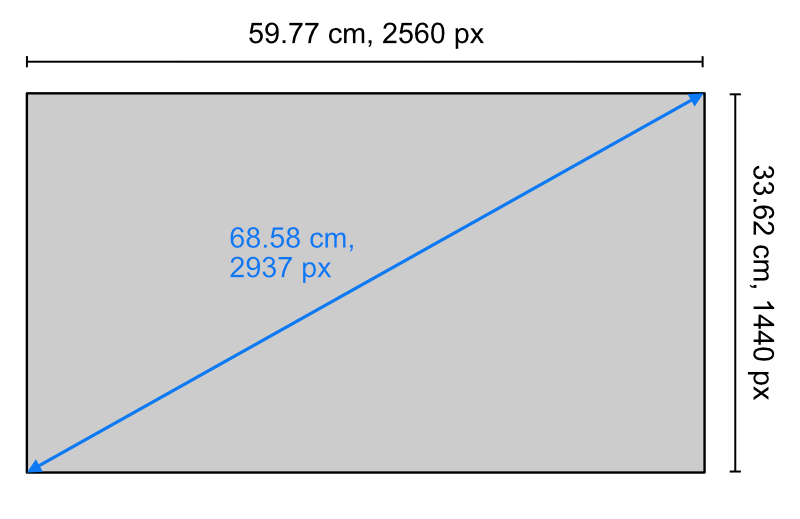
To summarise, our monitor has the following dimensions:
Calculating on-screen positions based on visual angles
Now that we know everything we need to know about our monitor, we can move on to calculating an on-screen position based on a visual angle. For simplicity, we’re going to round the monitor width to 60 cm.
For our example calculations, we will assume a viewing distance of 40 cm.5 That is, we know the size of one of the angles (20°) and the length of the leg adjacent to this angle (40 cm):
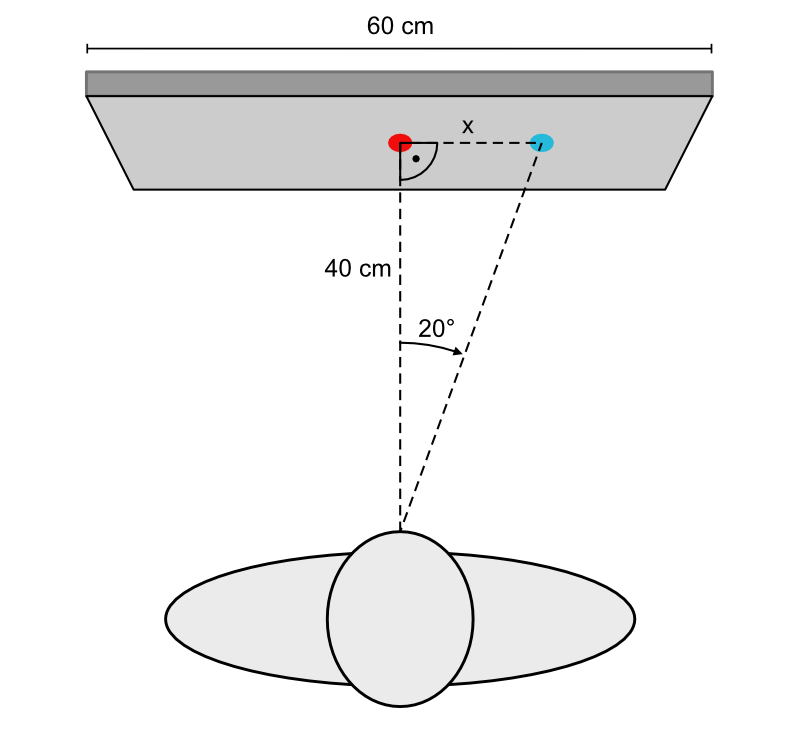
Note that we again have a right-angled triangle. Therefore, we can use a trigonometric function to calculate the length of the opposite leg \(x\). The trigonometric function that relates the opposite leg, the adjacent leg, and the angle is the tangent (tan):
\[\tan(\alpha) = \frac{\text{Opposite}}{\text{Adjacent}}\]
We substitute the known values into the formula and solve for our opposite \(x\):
\[\tan(20^\circ) = \frac{x}{40} \Rightarrow x = 40 \times \tan(20^\circ)\]
We can then use a calculator to find the value of \(\tan(20^\circ)\):
\[\tan(20^\circ) \approx 0.36397\]
…and calculate the value of x:
\[x_{cm} \approx 40 \times 0.36397 \Rightarrow x_{cm} \approx 14.56\]
Thus, our stimulus is 14.56 cm to the right of the centre of the screen.
Based on this information, we can also calculate the stimulus position in the other spatial units that PsychoPy offers.
In pixels:
\[\frac{14.56}{59.77} = \frac{x_{px}}{2560} \Rightarrow x_{px} = \frac{14.56 \times 2560}{59.77} \Rightarrow x_{px} \approx 624\]
In height units (note that the width of the screen in height units corresponds to the aspect ratio):
\[\frac{14.56}{59.77} = \frac{x_{ht}}{1.778} \Rightarrow x_{ht} = \frac{14.56 \times 1.778}{59.77} \Rightarrow x_{ht} \approx 0.433\]
In norm units (note that the width of the screen in norm units is 2):
\[\frac{14.56}{59.77} = \frac{x_{nm}}{2} \Rightarrow x_{nm} = \frac{14.56 \times 2}{59.77} \Rightarrow x_{nm} \approx 0.487\]
Calculating visual angles based on on-screen positions
Now let’s assume that we keep the stimulus position on the screen constant, but move 50% further away from the screen. Thus, the viewing distance is now 60 cm. To calculate the angle, we need to use the inverse tangent function, also known as arctangent (denoted as \(\arctan\), \(atan\), or \(\tan^{-1}\)):
\[\alpha = \arctan\left(\frac{\text{Opposite}}{\text{Adjacent}}\right)\]
Substituting the known values into the formula:
\[\alpha = \arctan\left(\frac{14.56}{60}\right) \Rightarrow \alpha \approx \arctan(0.242667) \Rightarrow \alpha \approx 13.6^\circ\]
Thus, if we increase the viewing distance to 60 cm, the visual angle decreases to 13.6°:

Advantage of visual angles
Visual angles have the following key advantage: If the monitor size and the viewing distance are known (e.g., in PsychoPy, this information can be saved in the Monitor Center), an experiment that defines stimulus positions and sizes in visual angles can run in exactly the same way (i.e., with the exact same visual angles) anywhere.
This is useful if:
- Data collection occurs across multiple labs.
- A monitor needs to be replaced and the new model differs in size and/or resolution.
- A researcher attempts to replicate an experiment.
Disadvantages of visual angles
As shown above, visual angles require knowledge about the monitor size and the viewing distance. If these measurements are not known or if these measurements vary over time, visual angles cannot be accurately calculated.
In addition, as we will show in Part II of this series, visual angle calculations are complicated by the fact that monitors are, well, not spherical.
Summary
The present blog post has discussed the concept of visual angles and has argued that these are relevant due to varying visual acuity across our visual field. We have explained that the calculation of visual angles requires knowledge of the monitor dimensions and the viewing distance.
We have also demonstrated how monitor positions can be calculated based on knowledge of visual angles using the tangent, and how visual angles can be calculated based on knowledge of on-screen positions using the inverse tangent.
Finally, we have described some of the advantages and disadvantages that visual angles have.
Footnotes
I.e., imagine you’re a cyclops. We’re making this assumption to simplify the illustrations and calculations that follow.↩︎
Note that all the drawings in this blog post are to scale. That means that you can use a ruler and a protractor to measure lengths and angles on your screen.↩︎
For simplicity, we’re ignoring the size of the stimulus and will pretend it’s just a point.↩︎
We’ll go through the detailed mathematical calculations further below.↩︎
Note that as the monitor is represented as a trapezoid to create a 3D effect, the monitor width on your screen necessarily varies. The correct width was placed in the centre of the trapezoid (where the red disk is).↩︎